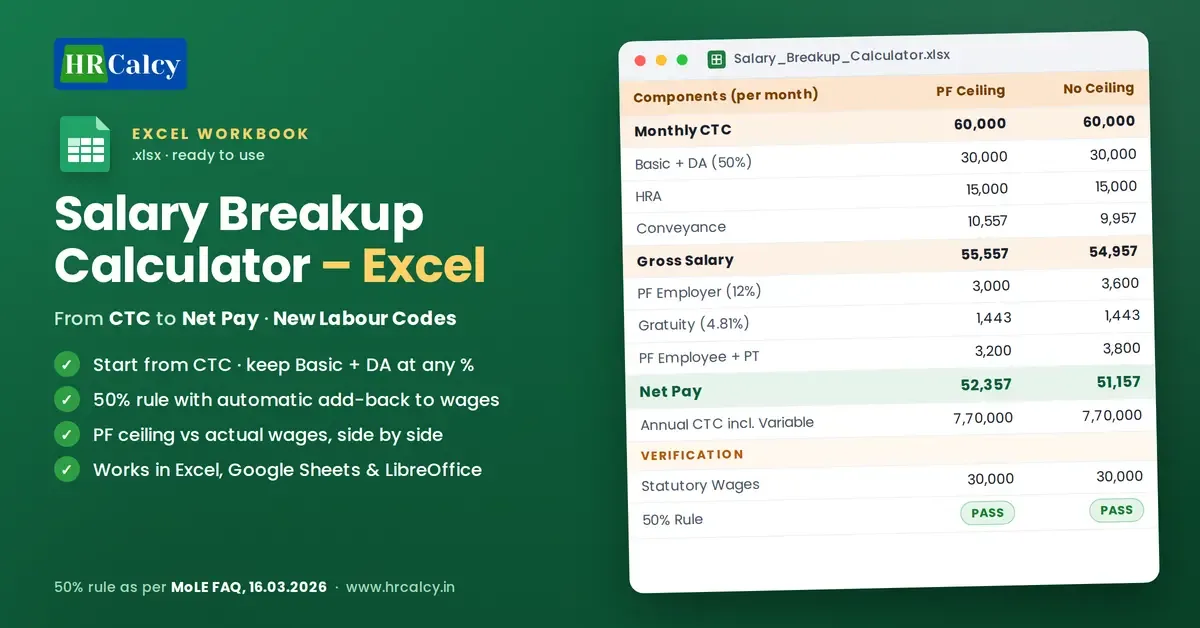
Salary Breakup Calculator – Excel | New Labour Codes
Excel salary breakup calculator for the New Labour Codes. Enter CTC and get Basic + DA, HRA, 50% wage add-back, PF, ESI, bonus, gratuity, deductions, Net Pay and annual CTC.
You save ₹50
🔒 Secure payment via Razorpay · Instant digital delivery
- 🔒 Secure Razorpay checkout
- ✅ Instant download after payment
- 📧 Download link also sent to email
- ⬇️ 72-hour · 3 downloads link validity
What's Inside
- Build a Salary Structure from CTC – Enter the monthly CTC and Basic + DA %. HRA, Conveyance and Gross Salary are worked out automatically.
- 50% Wage Rule Built In – Keep Basic + DA at any %. If allowances exceed 50% of total remuneration, the excess is added back to wages automatically.
- Contributions on Correct Wages – PF, ESI, bonus and gratuity are calculated on statutory wages after the add-back, not just on Basic + DA.
- PF With and Without Ceiling – Side-by-side columns compare PF at the ₹25,000 ceiling with PF on actual wages, and show the impact on deductions and CTC.
- Complete Employer Cost – Employer PF, Employer ESI, Statutory Bonus, Gratuity and Total Employer Contribution.
- Employee Take-Home – Employee PF, Employee ESI, Professional Tax, Total Deductions and Net Pay (before TDS).
- Monthly to Annual CTC – Monthly CTC, Fixed Annual CTC and Annual CTC including variable pay.
- Built-in Verification – Shows statutory wages, the excess added back and the 50% rule status.
- Simple Formulas – Works in Excel, Google Sheets and LibreOffice.
- Made for HR, payroll and C&B professionals who create, review or explain salary structures.
About This Product
Salary Breakup Calculator – Excel | New Labour Codes
Building a salary breakup is no longer just a matter of deciding Basic, HRA and allowances. Under the New Labour Codes, how wages are defined directly decides your PF, ESI, bonus, gratuity, take-home pay and employer cost.
Salary Breakup Calculator – Excel is a ready-to-use workbook for HR and payroll professionals. Enter a CTC, choose the Basic + DA %, and see the complete salary structure, worked out on the correct statutory wages.
How the Calculation Flows
CTC → Basic + DA → HRA → Conveyance → Gross Salary → Statutory Wages → Employer Contributions → Employee Deductions → Net Pay → Annual CTC
Change one input and every figure updates, so you can immediately see how one change affects the whole structure.
50% Wage Rule – Built In
Under the Code on Wages, if excluded allowances exceed 50% of total remuneration, the excess is added back to wages.
- Keep Basic + DA at any %. The calculator never forces Basic up.
- If allowances exceed the 50% limit, the excess is added back to wages automatically.
- The 50% test uses total remuneration, not CTC: Gross Salary + Employer PF + Statutory Bonus. This follows the Ministry of Labour & Employment FAQs dated 16.03.2026.
- PF, ESI, bonus and gratuity are calculated on these statutory wages, not just on Basic + DA.
Employer Contributions
- Employer PF (12%)
- Employer ESI (3.25%, rounded up as per ESI rules)
- Statutory Bonus (8.33% where wages are up to ₹21,000)
- Gratuity (4.81% provision)
- Total Employer Contribution
Employee Deductions & Net Pay
- Employee PF (12%)
- Employee ESI (0.75%)
- Professional Tax (manual entry, as per your state)
- Total Deductions
- Net Pay (before TDS)
PF With Ceiling vs PF on Actual Wages
Two columns, side by side:
- PF Ceiling: PF on wages up to ₹25,000
- No PF Ceiling: PF on actual wages
See at a glance how the PF choice changes employer contribution, employee deduction, Net Pay and CTC.
Monthly & Annual CTC
- Monthly CTC
- Fixed Annual CTC
- Annual Variable Pay (your input)
- Annual CTC incl. Variable Pay
Built-in Verification
Verification rows show the statutory wages, the excess added back and the 50% rule status. You can confirm the structure at a glance, and the calculations never depend on these rows.
Simple Formulas, Works Everywhere
Plain formulas with no macros. Works in Microsoft Excel, Google Sheets and LibreOffice.
Who Should Use This?
- HR professionals, executives and managers
- Payroll professionals, executives and managers
- Compensation & Benefits professionals
- HR and payroll consultants
- Business owners, employers and SMEs
Common Use Cases
- Create a new salary structure from CTC
- Break CTC into salary components
- Structure salary under the 50% wage rule
- Review or restructure an existing salary breakup
- Compare PF ceiling and no-ceiling scenarios
- Estimate employer contribution and cost
- Calculate employee deductions and Net Pay
- Calculate monthly and annual CTC
- Explain a salary breakup to employees or management
What You Receive
One Excel workbook (.xlsx): Salary Breakup Calculator – New Labour Codes.
It is a salary-structuring and calculation tool, not payroll software. It does not connect to EPFO, ESIC, banks or government portals.
Please note: Replace example values with your actual figures. Enter Professional Tax as per your state. Employer PF is shown at 12% (EDLI and admin charges, about 1%, are not included). Use the calculator together with current statutory provisions. This is for reference and not legal advice.