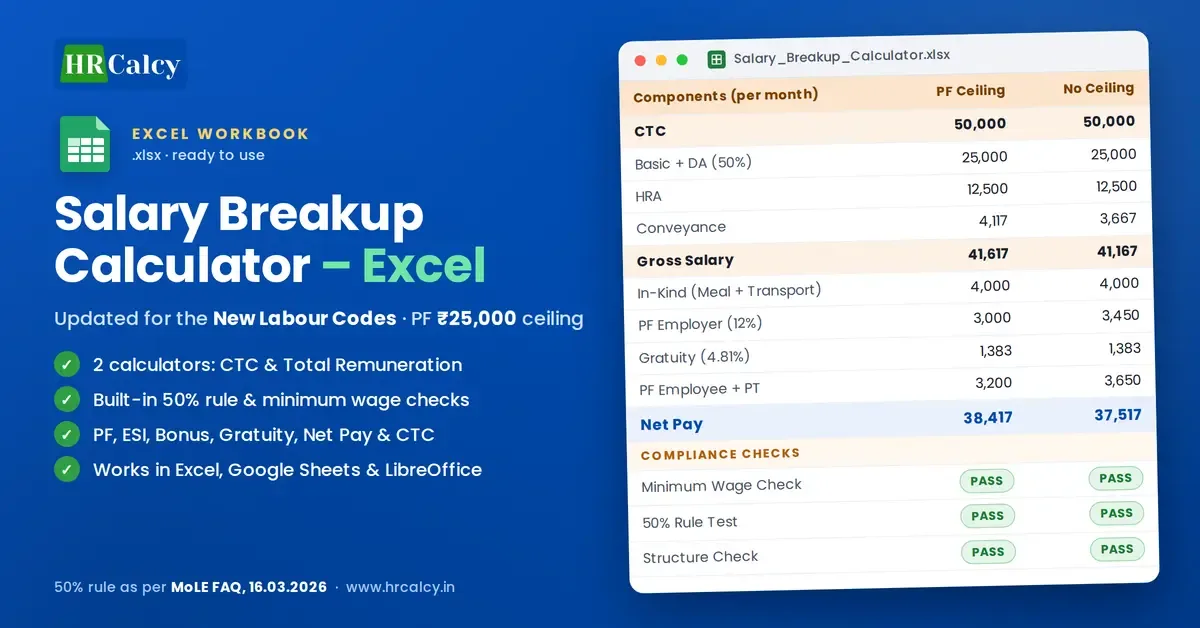
Comprehensive Salary Breakup Calculator | Excel
Excel salary breakup calculator for the New Labour Codes: CTC and Total Remuneration methods, PF (₹25,000 ceiling), ESI, bonus, gratuity, net pay, CTC and built-in 50% rule checks.
You save ₹400
🔒 Secure payment via Razorpay · Instant digital delivery
- 🔒 Secure Razorpay checkout
- ✅ Instant download after payment
- 📧 Download link also sent to email
- ⬇️ 72-hour · 3 downloads link validity
What's Inside
- 2 Calculators in 1 Workbook – CTC-Based and Total Remuneration-Based
- Built-in Compliance Checks – Minimum Wage, 50% Rule and Structure (PASS/FAIL)
- 50% Rule as per Ministry of Labour FAQ (16 March 2026)
- PF Ceiling vs No Ceiling Comparison – Updated to ₹25,000
- Full Employer Cost – PF, ESI, Statutory Bonus and Gratuity
- Employee Deductions & Net Pay – PF, ESI and Professional Tax
- In-Kind Remuneration – Meal Voucher & Transport, with 15% Rule
- Correct Statutory Bases – ESI Rounded Up, Bonus on Statutory Base
- Monthly CTC, Fixed Annual CTC and Annual CTC with Variable Pay
- Simple Formulas – Works in Excel, Google Sheets and LibreOffice
About This Product
Comprehensive Salary Breakup Calculator | Excel
Updated for the New Labour Codes (in force from 21 November 2025) and the ₹25,000 PF wage ceiling
Creating a salary structure is not simply a matter of dividing CTC into Basic, HRA and allowances.
Once PF, ESI, bonus, gratuity, minimum wages, in-kind benefits and the 50% wage rule come into play, a small change in one component affects the employee's take-home pay, the employer's total cost and compliance.
This calculator gives HR and payroll professionals a structured, reliable way to build, test and compare salary breakups in Excel, instead of calculating each component by hand.
What Makes This Calculator Different?
- Two calculators in one workbook: start from CTC or from Total Remuneration
- Built-in compliance checks: every structure is tested automatically and shows PASS or FAIL
- 50% rule applied the Ministry's way: employer PF and statutory bonus are included in the test, as clarified in the Ministry of Labour's FAQs of 16 March 2026
- PF Ceiling vs No PF Ceiling: both scenarios side by side, with the ₹25,000 ceiling
- Simple, reliable formulas: no macros and no complex functions; works the same in Excel, Google Sheets and LibreOffice
Calculator 1: CTC-Based Salary Breakup
Enter the desired CTC, and the calculator builds the complete structure so that every component reconciles back to the CTC you entered.
Calculator 2: Total Remuneration-Based Salary Breakup
Enter Total Remuneration (the value offered to the employee), and the calculator adds employer contributions on top to arrive at CTC.
Both calculators cover:
- Earnings: Basic + DA, HRA, Conveyance, Gross Salary
- In-kind benefits: Meal Voucher and Transport Facility, counted as wages up to the 15% limit
- Employer contributions: PF, ESI, Statutory Bonus, Gratuity
- Employee deductions: PF, ESI, Professional Tax, Net Pay (before TDS)
- CTC: Monthly CTC, Fixed Annual CTC and Annual CTC including variable pay
Built-in Compliance Checks
A check block under every calculation shows:
| Check | What it tests |
|---|---|
| Wages for PF/ESI/Gratuity | Basic + DA plus in-kind up to 15%, the base used for statutory contributions |
| Minimum Wage Check | Basic + DA against the minimum wage you enter |
| 50% Rule Test | Excluded components against 50% of remuneration (including employer PF and bonus) |
| Structure Check | Flags inputs that exceed the budget, for example a negative balancing allowance |
Each check says what to change if it fails, for example "raise the Basic + DA %".
Statutory Calculations Done Correctly
- PF: 12% of wages, restricted to the ₹25,000 ceiling in one column and on full wages in the other
- ESI: 0.75% / 3.25% where wages are ₹21,000 or less, rounded up to the next rupee as per ESI rules
- Statutory Bonus: 8.33% of the higher of ₹7,000 or the minimum wage entered, where wages are ₹21,000 or less
- Gratuity: 4.81% provision on wages, including in-kind within the 15% limit
PF Ceiling vs No PF Ceiling
See the effect of each PF choice on employer contributions, employee deductions, Net Pay and CTC side by side, without building two separate sheets.
Minimum Wage Reference
Enter the applicable minimum wage and the structure is checked against it automatically. The workbook shows an example figure (₹14,000); replace it with the minimum wage for your employee's category and State.
Who Should Use This?
- HR professionals, HR executives, HR generalists and HR managers
- Payroll executives, managers and consultants
- Compensation and benefits professionals
- HR consultants
- Business owners, employers, and small and medium-sized organisations
Typical Use Cases
- Create a new salary structure, or review an existing one for compliance
- Break a CTC offer into salary components
- Test whether a structure passes the 50% rule and the minimum wage check
- Compare PF restricted to the ceiling with PF on full wages
- Calculate take-home pay and total employer cost
- Explain a salary breakup to employees or management
What You Receive
1 Excel workbook with 2 salary calculators, each with its own compliance-check block and explanatory notes.
This is a salary calculation and structuring tool. It is not payroll software and does not connect to EPFO, ESIC, banks or government portals. Employer PF is shown at 12%; EDLI and admin charges (about 1%) are not included. Net Pay is shown before TDS.
Important: The workbook contains example values. Replace them with the actual salary, minimum wage and Professional Tax for your employee and State before using the results for payroll or compensation decisions. Statutory calculations can depend on employee circumstances, State requirements, company policy and current provisions, so always verify the applicable requirements.